
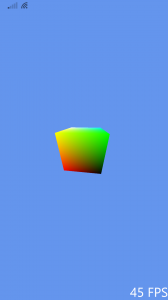
Windows Phone 8.1 DirectX Sample Landscape mode broken / rotation doesn’t work.

PortraitThe Problem: When the phone is in landscape mode, the rendered area isn’t rotated on screen! As you can see, the image on the right is when it is in portrait mode, the one below is when in landscape.

The problem is caused by the following code in DeviceResources.cpp:

	DX::ThrowIfFailed(
		m_swapChain->SetRotation(displayRotation)
		);

Since the window size being created is always the right size because in Windows Phone 8.1 the Bounds of the CoreWindow are reported correctly, we don’t actually need to rotate the swap buffer at all!

Either remove the code above or simple change it to:

	DX::ThrowIfFailed(
		m_swapChain->SetRotation(DXGI_MODE_ROTATION_IDENTITY)
		);

And it’s fixed! I hope this has helped 🙂

Landscape


6 responses to “Windows Phone 8.1 DirectX Sample Landscape mode broken / rotation doesn’t work.”

  1. Downloaded a game from mmygameapk. Seems safe enough, and the game’s running smooth. A decent resource for game downloads! mmygameapk

  2. Downloaded the g555gameapk. Installation was smooth. Got a decent selection of games right on my phone. Perfect for killing time on the commute. Good job, guys! Get your game on with g555gameapk!

  3. 88zh88 Game Download has a great selection of games! The download was straightforward and the game quality is excellent. Check it out and join some good times: 88zh88gamedownload

  4. Milyun88 looks like a decent option for a punt. Their website is easy on the eye and navigation is spot on. Give em a go, see if it’s for you. Here’s the link: milyun88.

  5. If you’re seeking xsmb hôm nay minh ngọc, look no further. This site provides everything I require. It offers me lots of opportunities to make smart decisions. See winning numbers here: xsmb hôm nay minh ngọc

  6. Is the tc lottery app any good? Easier to use than the website?

Leave a Reply

Your email address will not be published. Required fields are marked *